
Universal Skid Steer Harness vs. Wireless Control Box: Which Is Better?
You've got an attachment that needs electronic controls, but your machine either doesn't have joystick controls or you want a solution that works on absolutely any machine. You're looking at universal harnesses and wireless control boxes, trying to figure out which makes sense.
Let's be straight about this comparison. We make wireless control systems, so yeah, we're biased. But we also know exactly why universal harnesses exist and when they're the only option. We've seen them all, used them, and eventually built something better because we got tired of their limitations.
Here's the honest breakdown — what each solution does well, where each one falls short, and how to figure out which makes sense for your situation.
What Is a Universal Skid Steer Harness?
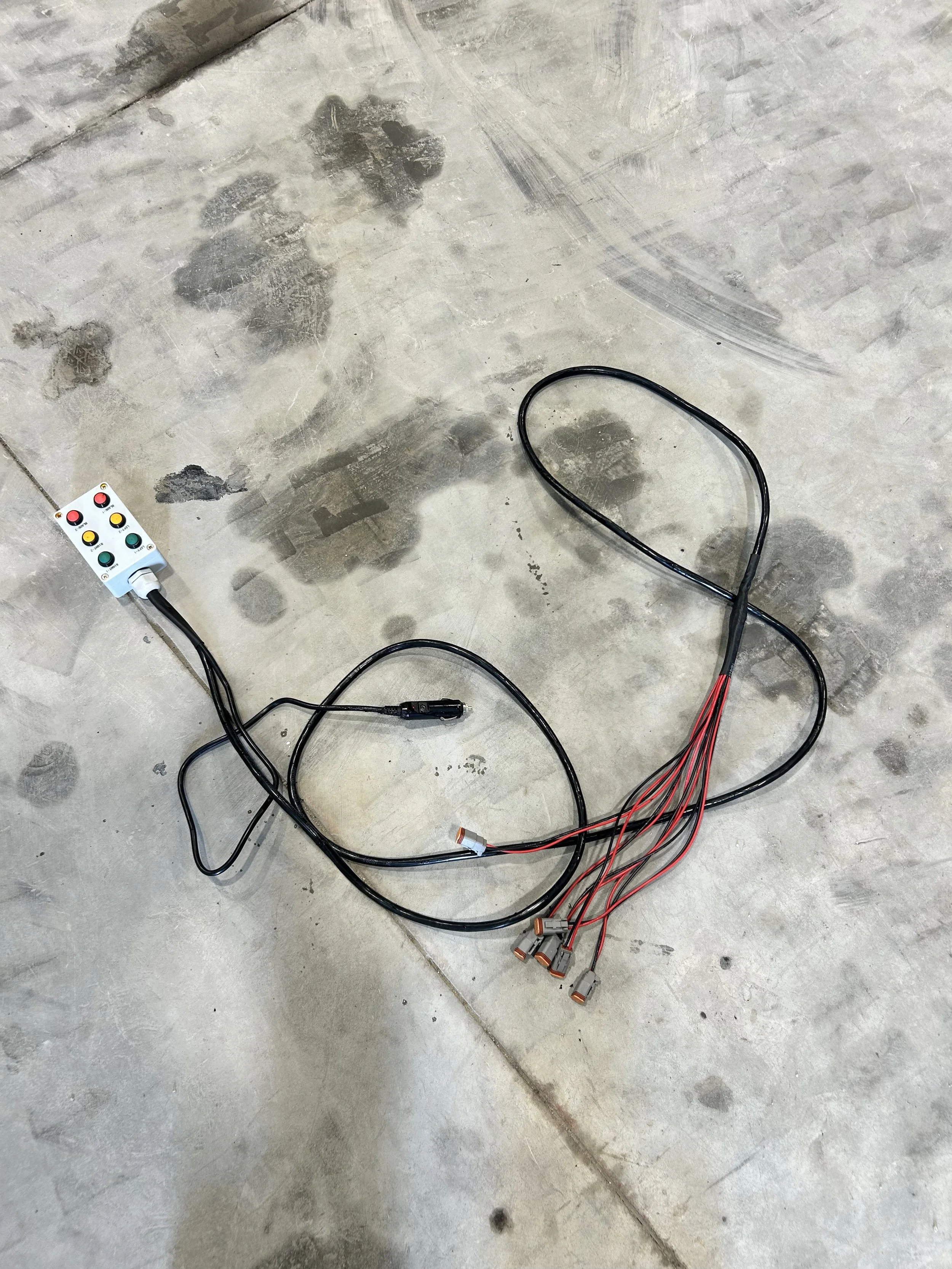
Universal Harness From Auction Machine. Note Cigarette Lighter Plug-In
A universal harness is a control system that wires directly to your attachment's solenoids and gives you a separate control unit to operate it. It bypasses your machine's electrical system entirely.
How it works:
Wires connect directly to the attachment's solenoids
A control unit (usually a bulky plastic box) mounts on the attachment with switches or buttons
Power comes from running a cable back to your machine's battery OR plugging into the cigarette lighter
You control the attachment using the switches on the control unit
Why universal harnesses exist: They solve two specific problems:
Old machines without joystick controls: If you've got an older skid steer that doesn't have auxiliary control buttons on the joysticks, a universal harness is basically your only option besides upgrading the whole machine.
Any attachment on any machine: Because the harness doesn't connect to the machine's control system at all, it works on literally any machine. The machine doesn't need any specific connector or control capability.
The reality of universal harnesses: They're bottom-of-barrel solutions. They work, but they're clunky. The control boxes are usually bulky plastic with switches that feel cheap. The power connection is always a pain — running a cable all the way back to the battery is annoying, and the cigarette lighter option never works reliably on skid steers (if it even works at all). If your machine has a door on the front, then you either have to run the cord through the door, or up the boom and through the window. Both options are a surefire way to rip it in half.
But for an operator with an old machine and no budget for upgrades, a $200-400 universal harness gets the attachment working. That's the value proposition.
Universal Harness vs. Adapter Harness (Important Distinction)
Quick clarification because these get mixed up:
Universal Harness (what this article is about):
Wires to solenoids directly
Has its own control unit with switches/buttons
Needs power from battery or cigarette lighter
Makes attachment work on ANY machine (because it doesn't use machine controls at all)
Required for machines without joystick controls
Typical cost: $200-400
Adapter Harness (different product):
Converts one connector type to another (Bobcat 7-pin to CAT 14-pin, etc.)
Lets you use your machine's existing joystick controls
Doesn't work on machines without controls
Solves connector compatibility, not control capability
Typical cost: $150-1,200 depending on type
This article compares universal harnesses (bottom-barrel remote control systems) to wireless control boxes (modern remote control systems). If you're looking at adapter harnesses for connector compatibility, check our compatibility guide instead.
What Is a Wireless Control Box?
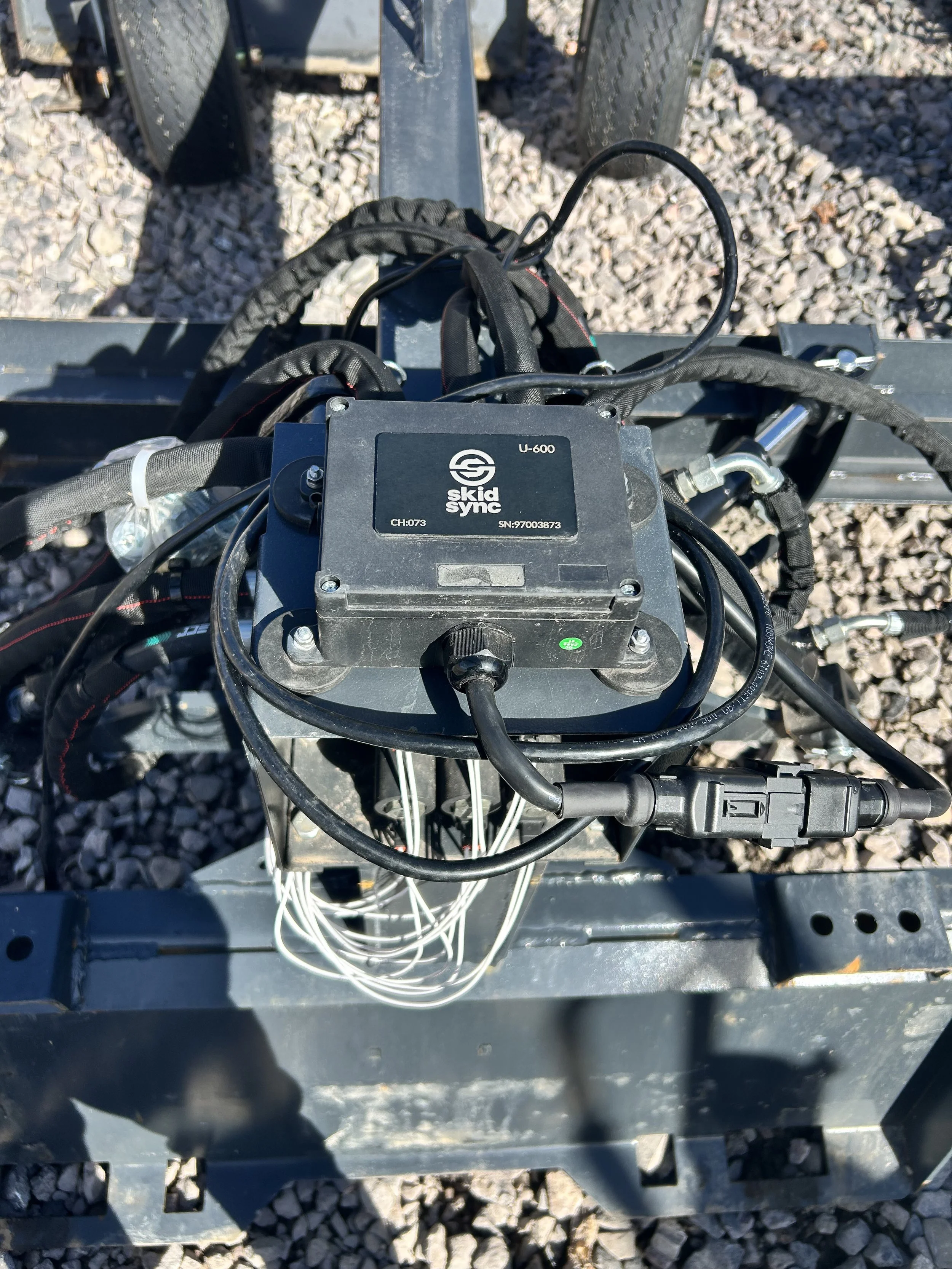
U600 Universal Control Box mounted to the auction attachment.
A wireless control box does the same basic job as a universal harness — it wires directly to your attachment's solenoids and gives you independent control. But that's where the similarities end.
How Skid Sync wireless works:
Quick-connect harness wires to the attachment's solenoids (one-time install, stays on attachment)
Battery-powered control box snaps onto the harness quick-connect
Pre-paired wireless remote communicates with the box on a unique channel
No power connection to the machine needed — it's completely self-contained
Why we built this: We got tired of dealing with clunky universal harness control boxes and the constant headache of power connections. We wanted something that worked like a universal harness (any attachment, any machine) but felt professional and modern.
So we built a system with a clean wireless remote, rechargeable battery, and quick-connect harnesses that make attachment swapping trivial. It's what universal harnesses should have been from the start.
Installation: Universal Harness vs. Wireless
Universal Harness Installation
Initial setup per attachment:
Wire the harness to the attachment's solenoids
Mount the control unit (bulky plastic box with switches) on the attachment
Run power cable from attachment to machine battery OR plug into cigarette lighter
Secure cables so they don't get caught
Time: 30-45 minutes per attachment
The power connection problem: This is the worst part. Running a cable from the attachment all the way back to the battery under the seat is a pain. You're routing cables, trying to keep them from getting pinched or caught, hoping they don't get damaged.
The cigarette lighter option sounds easier, but it's unreliable. Half the time, skid steer cigarette lighters don't provide clean power or enough current. They'll work for charging your phone, but a control system pulling multiple amps? Hit or miss.
The daily reality: Once installed, the universal harness just lives on that attachment permanently. The control unit with its switches is always there. You use it, it works (usually), and you deal with the clunky interface and the power cable running back to the machine.
If you swap attachments, the next attachment either needs its own universal harness already installed, or you're moving the harness between attachments (which nobody wants to do because rewiring solenoids every time is awful).
Wireless Control Installation
Initial setup per attachment (one-time):
Wire the quick-connect harness to the attachment's solenoids
Mount the harness on the attachment
Time: 20-30 minutes per attachment (one time, permanent)
No power connection needed: The control box runs on its own rechargeable battery. There's no cable to the machine. Nothing to route, nothing to secure, nothing to get caught or damaged. The machine doesn't even know the system exists.
The daily reality: Snap the wireless control box onto whichever attachment you're using (10 seconds). Use the pre-paired remote to control it. When you switch attachments, pop the box off, snap it onto the next attachment. The harnesses stay on the attachments permanently — they're already wired and ready.
No cable management. No power connection headaches. No bulky switches mounted on the attachment. Just a clean remote in your hand.
The upfront installation is actually simpler than universal harnesses (no power cable to route). And after that, attachment changes are trivial.
User Experience: Switches vs. Wireless Remote
This is where the difference becomes really obvious in daily use.
Universal Harness Control Experience
The control unit: Big plastic box mounted on your attachment with switches or toggle buttons. Usually feels cheap and industrial (because it is cheap and industrial).
Operating the attachment: You're reaching out to flip switches on the attachment or pressing buttons on a control box that's strapped to the attachment somewhere. It works, but it's clunky.
If the control unit is mounted in a spot that's hard to reach when the attachment is on the machine, that's annoying. If it's in an easy spot, it's probably in the way of something else.
In the cab: You're not really "in the cab" with most universal harness systems — you're leaning out or reaching to access the controls on the attachment.
Wireless Control Experience
The remote: Clean, handheld wireless remote. Pre-paired to the control box. Works from anywhere within 100+ feet.
Operating the attachment: Press button on remote in your hand. Attachment responds instantly. That's it.
In the cab: You can stay in the cab if you want. Or stand outside for better visibility. Or control the attachment from 50 feet away if that's useful for your situation. The remote works from anywhere.
The wireless remote feels like a modern tool. Universal harness switches feel like something from the 1980s (because the design basically is from the 1980s).
Cost Analysis
Let's talk numbers.
Universal Harness Costs
Initial investment: $200-400 per attachment
For 6 attachments: $1,200-2,400
Long-term costs:
Power cable wear and replacement: expect issues every 2-3 years from cable damage
Control unit replacement if damaged: $100-200
Cigarette lighter plug replacements if you go that route: ongoing annoyance
5-year total cost estimate (6 attachments): $1,500-3,000
Wireless Control Costs
Initial investment:
1 wireless control box: $800
Quick-connect harnesses: $50 per attachment
For 6 attachments: $800 + $300 = $1,100
Long-term costs:
Battery replacement (year 2-3): Free
Harnesses rarely fail (permanently mounted, protected)
5-year total cost estimate (6 attachments): $1,250
Break-even point: At 3+ attachments, wireless costs the same or less than universal harnesses while being dramatically better to use.
Flexibility: Multiple Attachments
Universal Harness Flexibility
One machine, multiple attachments: You need one universal harness per attachment, each permanently installed. That's $200-400 per attachment. If you've got 6 attachments, that's $1,200-2,400 invested.
Multiple machines, multiple attachments: No additional cost actually — since the universal harness doesn't connect to the machine at all, the same attachment with its harness works on any machine. This is actually the ONE advantage universal harnesses have: true machine independence by design.
Expanding your operation: Add three new attachments = $600-1,200 in new universal harnesses
Wireless Flexibility
One machine, multiple attachments: One control box works with all attachments. Just move the box from attachment to attachment.
Multiple machines, multiple attachments: Same story — one control box works with everything because the box doesn't connect to the machine either.
Expanding your operation: Add three new attachments = three $50 harnesses = $150
Wireless scales way better economically as you add attachments.
Reliability and Maintenance
Where Universal Harnesses Fail
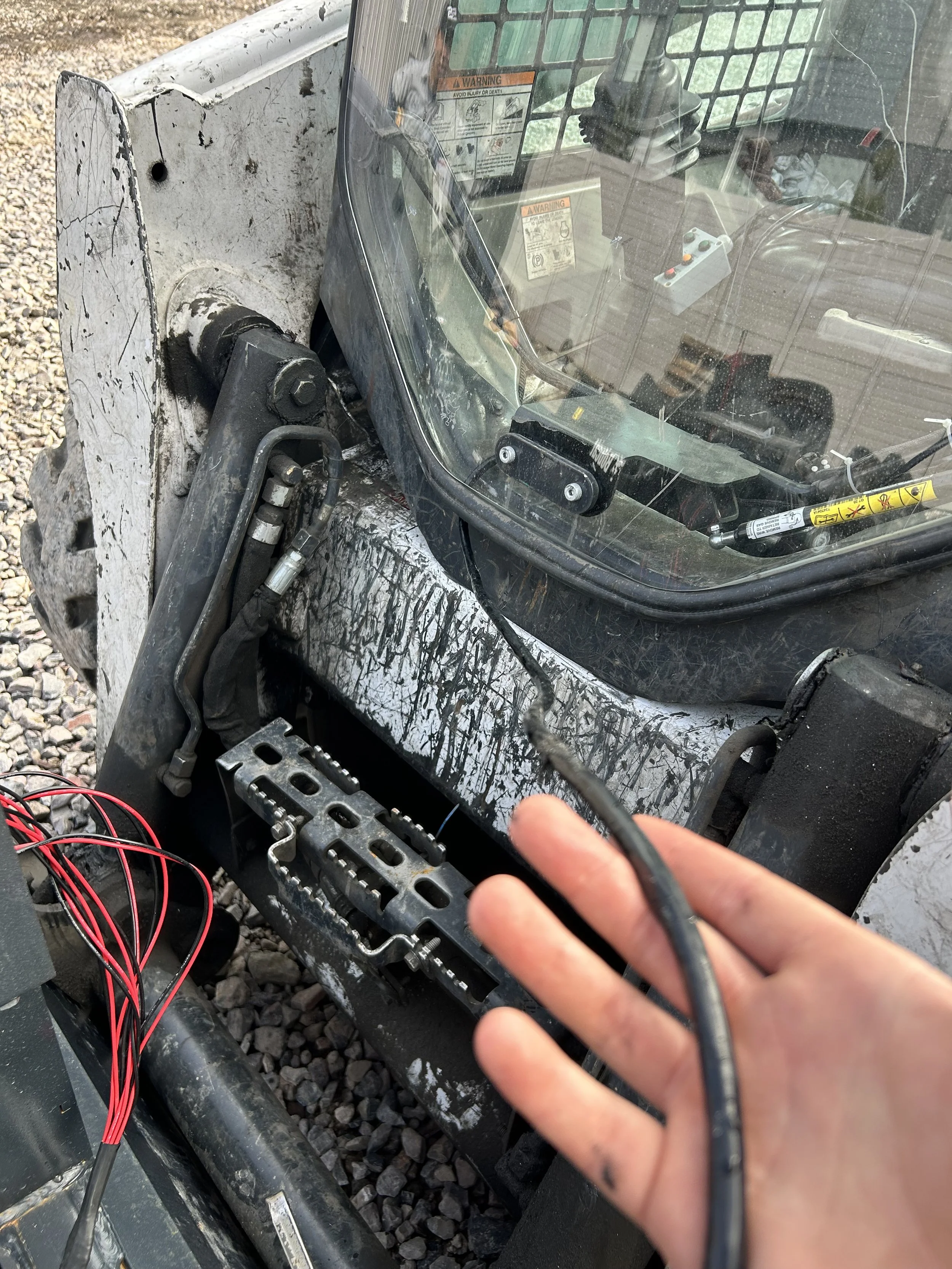
Universal harness has to be run through the door to work.
Common issues:
Power cable damage (gets caught, pinched, run over)
Cigarette lighter connections failing or providing bad power
Switch wear on the control unit (cheap switches don't last forever)
Water getting into the control unit (it's "weatherproof" but not always weather-proof)
Control unit getting physically damaged (it's mounted on the attachment in harm's way)
Maintenance required:
Keep power connections clean and secure
Replace power cables when damaged
Replace control units when switches fail or unit gets damaged
Lifespan: 3-5 years typical, less if you're hard on equipment
Where Wireless Can Fail
Common issues:
Battery needs charging (this is by design, not a failure)
Occasional battery replacement every 2-3 years
Maintenance required:
Charge the battery regularly (like your phone)
Keep the control box reasonably clean
Lifespan:
Control box: 5-10+ years (no mechanical wear points)
Quick-connect harnesses: essentially permanent (protected, rarely handled)
Remote: years of use with normal care
The wireless system has fewer failure points because there's no power cable and the control box isn't permanently exposed on the attachment.
When Universal Harnesses Make Sense
Let's be fair about when you'd choose a universal harness:
Universal harnesses make sense if:
You have an OLD machine without joystick controls (you have no other choice)
You're on an extremely tight budget ($200-300 vs $850)
The clunky switches don't bother you
Example scenario: You've got a 1990s skid steer with no auxiliary controls on the joysticks. You bought a used dozer blade that needs electronic control. A $250 universal harness is literally your only option short of upgrading the entire machine. In this case, the universal harness solves your problem at the lowest cost.
When Wireless Makes Way More Sense
Wireless is the clear winner if:
You value user experience and convenience
You swap attachments frequently
You work on different machines or rent equipment
You want a professional-grade solution that doesn't feel bottom-barrel
You're building a system for the long term
Example scenario: You've got multiple machines and 6 attachments. Universal harnesses would cost $1,200-2,400 with clunky switches and power cable headaches on every attachment. Wireless costs $1,100, you get a clean remote, no power cables, and 10-second attachment changes. Not even close.
The Break-Even Point
Attachment count:
1-2 attachments: Universal harnesses are cheaper upfront ($400-600 vs $900)
3+ attachments: Wireless costs the same or less ($1,100 vs $1,200+)
6+ attachments: Wireless saves you $900-1,300 AND gives you way better usability
User experience value: If you put any value on convenience, wireless wins at any attachment count. The question is whether the $300-500 premium (on 1-2 attachments) is worth it for the better remote and no power cables. For most operators, it is.
Real-World Use Cases
Old Machine, One Attachment
Setup: 1995 skid steer with no auxiliary controls, one dozer blade
Universal harness: $250, only option that works
Wireless: $850, works great but expensive for this scenario
Winner: Universal harness (budget constraint + only one attachment)
Modern Machine, Multiple Attachments
Setup: 2018 CAT with controls, 5 attachments, want universal compatibility
Universal harness: $1,000-2,000 for 5 harnesses, clunky switches
Wireless: $1,050 for full system, clean remote, fast swapping
Winner: Wireless, not even close
Rental/Diverse Fleet Operation
Setup: Work on rental machines, 8 different attachments
Universal harness: $1,600-3,200, power cables everywhere
Wireless: $1,200, one box that works anywhere
Winner: Wireless, massive convenience advantage
Contractor Building Up Fleet
Setup: Starting with 2 attachments, plan to expand to 8
Universal harness: $400-600 now, $1,600-2,400 later
Wireless: $900 now, $1,200 later (just add $50 harnesses)
Winner: Wireless for long-term economics
What We Recommend
If you're trying to decide, here's our straight advice:
Go with universal harnesses if:
Budget is extremely tight and you only have 1-2 attachments
You're okay with clunky switches and power cable hassles
Go with wireless if:
You have a modern machine but want universal compatibility
You have 3+ attachments (economics favor wireless)
You value user experience and convenience
You plan to expand your attachment collection
You work on different machines or rent equipment
You want a professional-grade solution
For most operators with any kind of diverse operation, wireless wins on cost (at 3+ attachments), wins dramatically on convenience, and wins on long-term durability.
The Bottom Line
Universal harnesses are the bottom-barrel solution that gets old machines running with electronic attachments. They work, but they feel cheap and the power connection is always annoying.
Wireless control systems are the modern version of the same concept — direct control of solenoids, works on any machine — but executed properly with a good remote, rechargeable battery, and clean installation.
We built Skid Sync because we were tired of clunky universal harness switches and power cable headaches. If you're in the same boat — tired of the cheap feeling, annoyed by power connections, ready for something that feels like a professional tool — wireless is the upgrade you're looking for.
Check out our 4-function and 6-function wireless control systems and see if they make sense for your operation. Or download our free compatibility matrix to understand all your options.
Questions? We've dealt with pretty much every control scenario there is. Reach out and we'll help you figure out the best solution for your setup.
Shop Wireless Control Systems | Download Free Compatibility Matrix | Read: How Wireless Controls Work | Contact Us
